Updating DNS server IP addresses on Cisco voice servers

This post focuses on something that went right when making voice changes – shocking, I know!  Yes, I did open two different TAC cases before making the changes, and yes, I did have to talk to TAC once during the actual change process, but in my book, that’s a total win.

My mission, which the sys admin gave me no choice but to accept, was to change the DNS ip addresses each voice server was pointing to.  Now in sys admin world, this is hardly a big thing, but in voice world, no change is so small and insignificant that cannot be made intricately cumbersome to complete.

If you live in the CUCM 8.x universe, you are probably familiar now with the concept of a license mac. Changing any of the components that went into generating the precious license mac for the server invalidates all the pretty, pretty licenses you spent hours (likely even days) of your life trying to get in the first place. Changing primary DNS *is* one of those components in 8.x, so accepting your fate of needing to rehost licenses for ALL THE THINGS is step one in 8.x universe. Step two likely involves some heavy drinking.

But I currently live in 9.1.2 world – so some of this misery is offset.  The CUCM and Unity Connection (UNCX) teams at some point decided this whole invalidating-the-licenses-for-minor-changes deal was a suckfest, at least I’m assuming that was their thought process, so with version 9.x, changing primary DNS server ip address for CUCM and UNCX servers doesn’t upset the license mac gods. Cisco IM&P now leverages CUCM licensing in 9.x, so no rehosting required for those servers, either.

UCCX, though. Of course UCCX still cares. Because UCCX.

So enough background and onto the process – which is pretty straightforward considering it’s voice stuffs. Standard disclaimer, I put this list together from various calls with TAC asking for documentation and clarification on the process for each application and what to expect. Your mileage may vary, don’t take my word for it, always have a good backup, and certainly don’t blow your voice servers up. Check the docs, check with TAC. Note that for each application, the changes are made on the publisher/primary server first, then any subscribers or secondary servers.

For CUCM and UNCX servers:

-In the GUI of the License server, remove the CUCM or UNCX server instance from the License server.  Yes, I know the trepidation of deleting anything from a voice server – especially involving licensing, but it is strongly recommended to do so. If you forget or don’t do this, PROBABLY nothing will happen, according to my conversations with TAC.  But no way I’m taking that chance, you decide for yourself…

-At the CLI of the server, issue the following commands:

set network dns primary X.X.X.X
set network dns secondary X.X.X.X
show network eth0 – confirm the changes

-Add the instance back to the license server and synchronize. When adding the server back, remember it’s the OS username and password that you want to be using.

-Additional step for CUCM highly recommended by TAC: restart the Cisco Tomcat service at the CLI with the command utils service restart Cisco Tomcat

-This is also the process for stand alone license servers, but of course you don’t have to remove any instances from the license server or perform the Tomcat restart.

For IM&P servers:

-At the CLI of the server, issue the following commands:

set network dns primary X.X.X.X note you will still get an error message that rehosting is required, but I confirmed later with TAC that this is just a holdover error message from the 8.x days.
set network dns secondary X.X.X.X
show network eth0 – confirm the changes

For UCCX servers (note I have an HA environment):

-Take note of the current server license MAC, put it in a safe place.  I copied the contents of the license files to my desktop and took a screenshot of the current license configuration page. Because it’s voice and the paranoia with licensing runs deep.

-Sacrifice a chicken or two, and then at the CLI of the server, issue the following commands on each server:

set network dns primary X.X.X.X
set network dns secondary X.X.X.X
show network eth0 (confirm the changes)

-Reboot the primary, wait for what feels like an eternity for the primary to come back up and get it’s services started, then reboot the secondary.

-Take note of the new license mac and request a rehost, provide licensing with the new and the old license macs.

-Load the new license file and start happy dance.  Unless you hit an issue like I did and the new license won’t load. Then try another reboot of the pair, attempt license load once more with fingers more tightly crossed than before, and then proceed to happy dance.

Last, but not least, my good twitter friend and awesome voice guru Ryan Huff pointed out to me this Answer File Generator tool which can be used to predict your new license mac so you can request a rehost in advance. I decided that the 30 day grace period for UCCX would be enough for this project, but it’s fantastic to know that such a thing exists. Especially if you are going to be invalidating a lot of licenses, have a very small change window, and want to go ahead and get off grace period licensing as quickly as possible*.


*my rehosted license file for UCCX was generated in under 15 mins. Impressive. Still a PITA, but at least a quick PITA…

Published 09/09/2015



Cisco Live 2015 – Community rocks.

FullSizeRender (22) The San Diego sun has set on another Cisco Live, closing out an amazing week of learning and community. As usual, Cisco Live 2015 was one jam-packed, over-before-you-know-it, week full of opportunities to learn and network with incredible peers.

Once again, I got to be part of Tech Field Day, attending presentations by both OpenGear and Netbrain.  I highly recommend checking out the videos for both, you won’t be disappointed. Netbrain even announced a DevOp version of their product, which allows you 10 free nodes. Super cool stuff, the demo will knock your geeky socks off.

And, of course, I got the hang with so many fabulous engineers, some I have come to know well over the years, and others were new shiny faces. Now I shall subject you to my camera roll, because awesome. Enjoy.

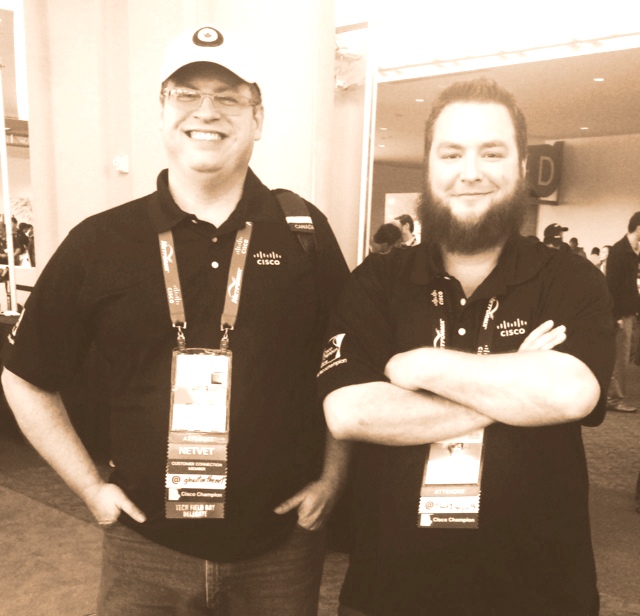
A Canadian and a Texan walk into a bar... @ghostinthenet @that1guy_15
A Canadian and a Texan walk into a bar… @ghostinthenet @that1guy_15
Oh, the priceless expressions of Canadian @Rob_Coote. It doesn't get any better. @sharpnetwork
Oh, the priceless expressions of Canadian @Rob_Coote. It doesn’t get any better. @sharpnetwork
The extremely intelligent, very kind @jamieljones, a total honor meeting her. She is an inspiration to anyone working to get their digits.
Wireless guys loving on wireless. @jsnyder81
Wireless guys loving on wireless. I find it’s better not to ask… @jsnyder81
Awwww, these guys... @tonhe @ciscovoicedude
Awwww, these guys… @tonhe @ciscovoicedude
The fabulous @pilotmike, oddly without his Blackberry. @denisefishburne
FullSizeRender (15)
Anti-social social dining. @avalonhawk @scottm32768 @radzima
Because network engineers ARE superheros. @scottm32768
Behold @vcabbage, the self proclaimed pretty, pretty princess.
Behold @vcabbage, the self-proclaimed pretty, pretty princess.
Some look better in skirts than others, just saying... @kathleenmudge @wifijanitor @subnetwork @ucgod @fryguy_pa @lauren @denisefishburne
Some look better in skirts than others, just saying… @kathleenmudge @wifijanitor @subnetwork @ucgod @fryguy_pa @lauren @denisefishburne
Yeah, what can I say about this? ;) @grinthock @Rob_Coote
Yeah, what can I even say about this? @grinthock @Rob_Coote
The incredibly smart, incredibly witty @drjmetz.
The expressions are priceless. @kathleenmudge @lauren @ucgod @wifijanitor
The expressions here are priceless. @kathleenmudge @lauren @ucgod @wifijanitor
Usually it's his backside people are posting... @networkingnerd
Usually it’s his backside people are posting… @networkingnerd
These two crack me up. @scottmorrisCCIE @denisefishburne
I love that @samplefive is just having a normal conversation in the background. @wifijanitor @fryguy_pa
Social media gurus @kathleenmudge @lauren
Sweet and amazing social media gurus. Thanks for all you do. @kathleenmudge @lauren
These two are fabulous. But don't tell them I said so... @fryguy_pa @subnetwork
These two are fabulous. But don’t tell them I said so… @fryguy_pa @subnetwork
Kilts.  There were kilts. (Why??!!) @subnetwork
Kilts. There were kilts. (Why??!!) @subnetwork
It's importance to have balance in your networking career.  @denisefishburne @nmarus
It’s important to have balance in your networking career. @denisefishburne @nmarus
FINALLY this guy decided to join us for a Cisco Live. About time... @JTIE_6EE7
FINALLY this guy decided to join us for a Cisco Live. About time… @JTIE_6EE7
Because UC engineers rule.  @mlundbom1 @ucgood
Because UC engineers rule. @mlundbom1 @ucgood
The awesome ginger princess @jay25f with the fantastic @denisefishburne.
Awwww...thanks @drjmetz for this pic. @networkingnerd
Awwww…thanks @drjmetz for this pic. @networkingnerd
The @ucpappy trying to collaborate on some new fangled device. @ucgod
The caffeinated side of the social media hub.  @fryguy_pa @bbaize @wifijanitor
The caffeinated side of the social media hub. @fryguy_pa @bbaize @wifijanitor
The non-caffeinated side of the social media hub. @bcjordo @hankito @tonhe
Completely impressed with the technology aid @CiscoTACOPS brings to disaster situations. @aconaway @bcjordo @densaer
Networking - it's about community.
Networking – it’s about community. And this community is incredible.
How we all felt by the week's end. @lauren
This sums up perfectly how we all felt by the week’s end. @lauren

Published 6/19/2015

Voice basics: troubleshooting a failed outbound fax

Faxing is a technology that instead of nuking it from orbit (the only way to be sure), we’ve propped it up and tried to make it part of the VoIP world, resulting in a whole lot of troubleshooting and whole lot of bang-head-here moments for voice engineers.

While time, variances in equipment, and sheer PTSD keep me from exploring all the ways in which faxing can suck go wrong, I thought I’d throw out a recent example of an all too common occurrence – proving your fax machine isn’t the (biggest) offender in an outbound communication failure.

Specifically, this example deals with an XMedius fax server, a Cisco voice gateway with PRI, and a who-knows-what fax endpoint on the other side.  Your mileage in fax troubleshooting may and likely will vary, just keep that in mind and a drink at hand.

The first step in dealing with one of these reported issues (after cursing, of course) is to determine if it’s an isolated incident or possibly a dialing issue.  Besides calling and confirming* a fax machine actually picks up, checking your inbound and outbound logs on the fax server can quickly quell those reports the server is down when someone really forgot to dial a 9 when sending the fax. Happens all the time.

In my case, I had plenty of inbound/outbound successes to determine this was an isolated case.  I also had the packet capture feature of XMedius turned on.**

This feature is brilliant, truly not an understatement.

I opened the packet capture for one of the failed attempts, navigated to Telephony -> VoIP Calls -> and then selected Flow for my call.  When you do this, there will be quite a bit of information presented in graph form.

You should be looking for a few basic things in particular:

  • Do you see the call ever connect?
  • Do you see the sender’s cng (calling tone) packet?
  • Do you see a DIS (Digital Identification Signal) from the remote endpoint?
  • Do you see the sender’s training message?
  • Do you see the remote endpoint’s CFR (confirmation to receive)?

In my flow graph of the not-so-happy fax, I notice that even though I’ve made contact with the (whiny) fax machine on the other side and negotiations have been successful – the remote endpoint never sends a CFR, therefore the server will not send the fax data.

The fax server tries again and again to elicit a response, but there’s only silence from the other side.  I assume because the remote endpoint realized that for every successful fax, a puppy dies.  Well, that’s the rumor I’ve heard (or started).

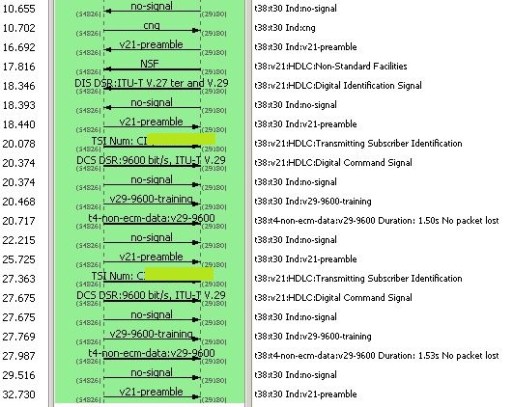
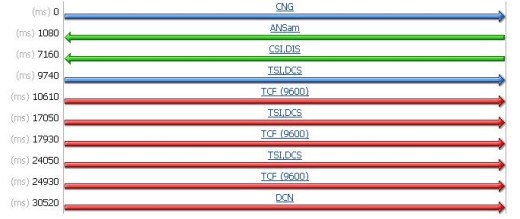
Here’s an excerpt from the flow graph, definite lack of CFR.

No CFR

Below is flow graph of a fax that the server sent successfully to another number.  While there are differences, you can see that CFR goodness the flow graph above is missing.

Successful Fax

After reviewing this information, I moved onto finding out if the voice gateway ever sees the CFR and maybe just forgets to send it along.

After working with TAC and doing a PCM capture on the gateway, I was able to confirm that the remote endpoint never sends the CFR, which meant I could declare with some amount of relative certainty that this was a whole lot of not-my-problem.***

TAC even provided me this handy-dandy flow graph built from the captures we took on the gateway, you can see that the fax server tries three times (TCF (9600)) to get the remote end to cough up a CFR, but no dice.

outbound fax flow

While this just scratches the surface, these basics, along with a formidable hammer, should get you started in your fax fighting mission. Just remember to really effectively troubleshoot a fax machine, it’s all in the swing…


Published 4/10/2015

*Do not skip this step. Never assume a user is asking you about problems with a working telephone number.  Always test from outside your phone system to confirm that the phone number in question hasn’t been disconnected or written down wrong by the user. This will save you countless hours and possibly what’s left of your sanity.

**Check your XMedius Administrator’s guide or call their support for steps to turn on this feature, it’s a pretty straightforward process and well worth the time.

 ***Trust me there are no absolutes in fax, unless you’re talking about frustration, that part is guaranteed.

Short and sweet – how to block an incoming call on your voice gateway

Welcome to a quick post on how to block an incoming call when you know the calling number you want to block. Specifically, this is how I would block an incoming call on a Cisco voice gateway with an ISDN PRI attached. Your mileage might vary a little with SIP trunks and will definitely vary quite a bit with MGCP.*

The first thing you need to do is create yourself a voice translation rule, something like this ought to do the trick:

voice translation-rule 9
rule 1 reject /5550005555/   <<keep in mind this is the calling number you want to block, but I like to test initially with an outside number such as my cell phone that I can test with.

Then set yourself up a lovely translation profile that references the rule you just created. Name it something obvious so that the next administrator doesn’t have to beat you to death for your obscurity:

voice translation-profile CALLBLOCK
translate calling 9

To complete the configuration, add these two commands to your incoming POTS dial-peer.  If you aren’t sure what your incoming dial-peer is, use the debug voip dialpeer all command and make a test call.  This is a good idea even if you think you know what the inbound dial-peer is because sometimes life is whimsical, and dial-peer configurations even more so.

dial-peer voice 4445 pots
call-block translation-profile incoming CALLBLOCK
call-block disconnect-cause incoming unassigned-number

There are a few ways to test this.  As I mentioned before, you can use your own cell phone number in the original configuration and confirm that the call blocking works. Then just substitute the to-be-blocked number into the voice translation rule.

You can also run the following command and see what the router *thinks* it will do when it sees the number you are trying to block:

test voice translation-rule 9 /5550005555/
/5550005555/ blocked on rule 1

As with all things voice, there are eleventy-billion ways to accomplish a task, this post just covers one.  If you have another method you prefer, please share in the comments, would love to hear it.

Published 03/10/2015

*The process with SIP trunks is practically the same, your inbound dial-peer won’t be POTS, though.  MGCP will require you to use CUCM 8.0 or later for this, check out this document


Changing your Unity Connection SMTP domain

Changing the SMTP domain on a Unity Connection server really isn’t that big of a deal, but as with all things voice, no change works as initially advertised.  Previously, I had never had cause to mess with the SMTP domain address, but recently one of the major cell providers quit delivering our voice mail message notifications to devices and, not surprisingly, users were none to happy about it.

My guess was that the carrier in question didn’t much like the format of the sender address, since it included a sub domain: unityconnection@myservername.mydomainname.com.  I quickly decided that changing the SMTP domain on the server would easily test that theory and seemed far less painful than opening a ticket with a large service provider*. I did open a TAC case just to see if there were any caveats in making this change I might want to be aware of. That’s a whole lot of voice experience talking…err, writing. The voice paranoia runs deep for a reason.

TAC indicated that not only was this a simple change as thought, but that only one service would have to be restarted – the Connection Conversation Manager, and that wasn’t to be a big deal. Well, finding that hard to believe**, I proceeded to make said change and found that there’s a little more to the story.

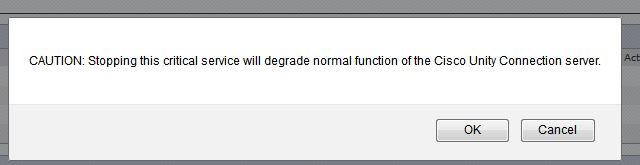
First – there are *three* services that have to be restarted, and since two of them are critical services, you experience a failover if you are running in HA. The system does warn you this will happen, and for what it’s worth I did not experience a loss of service doing this. Certainly don’t blame me, though, if you do have an outage and aren’t in a maintenance period when you attempt this change.

smtpUnity


Of course, you get to rinse and repeat on the secondary server in an HA environment. Personally, nothing about the warning prompt I got on the secondary server indicates this is not a big deal, but hey, maybe that’s just me…

smtp-connection conversation manager secondary

That being said, once the services were restarted, and my blood pressure returned to normal, I expected to see the SMTP domain updated and a happy dance to ensue.  Alas, that was not the case.  After consulting with TAC, and without the least bit of surprise whatsoever, I found that a reboot was “sometimes”, infer always, required.

This did fix my problem and the delayed happy dance was epic. And thankfully not recorded for the sake of my remaining pride.


Published 1/26/2015

*Almost all levels of hell are more pleasant than opening a case with a carrier. I suspect Satan actually admires the ingenuity of carriers and any future levels of hell are modeled on their expertise and innovation in human suffering.

**There is seemingly far more proof of the existence of the Loch Ness Monster, Big Foot, and the Abominable Snowman than of something involving voice being “easy”

Runt Post: HP Discover Notes

Last week I had the privilege of attending HP Discover in Barcelona and thought I’d hit the highlights while they were still fresh in my mind.

HP’s continued OpenFlow work stood out last week as HP has several applications leveraging OpenFlow available to customers now. One of the things that I find most appealing is that there are actually *campus* SDN applications, not just data center applications. Recently, data center has received all the love in networking innovation, leaving campus networks to the same old same old. Campus networks, however, represent a wide range of potential for SDN, so it’s nice to see some OpenFlow applications focused in that direction. The Network Optimizer application that dynamically allocates bandwidth for Lync experiences and the Network Protector app that leverages a TippingPoint Reputation database are the HP SDN applications I’ve heard the most about, but a look at the SDN App store shows there are quite a few others out there, customer ready and available.

HP’s Intelligent Management Center caught my attention when listening to the Packet Pusher’s episode on the platform and after talking to Chris Young about the product at Discover, I am all the more curious to get a demo up and running.  IMC not only allows for your basic network management and monitoring tasks, but also offers advanced features such as config validation and device configuration from a centralized management console. It won’t get rid of all your other single pains – err – panes of glass, but does look quite promising for centralizing network management in a way that doesn’t suck your will to live as some of the larger, more bloated platforms tend to do. Also, support of third party devices is big for anyone not running HP gear exclusively or even at all. The insight into ESXi servers also caught my interest as being super cool – a way to see into what those wily sys admins have done with their virtual switches while they blame your physical switches for the problem.

I also found the work HP Labs is doing to be quite fascinating.  Having an increased R&D budget as of late, the HP lab geeks are taking on some pretty cool projects. Much of their energy is being funneled into photonics and memristor technology projects, collectively referred to The Machine. Personally, the name “The Machine” sounds a bit over the top, but there is some serious science going on in this line of research and my geek DNA can’t wait to see what develops from these endeavors.

I had a highly enjoyable experience overall and loved getting to geek out over tech with some other seriously fabulous nerds – you should check them out as well because they are *awesome*.

Published: 12/9/2014


Disclaimer: While HP Networking was very generous to invite me to this fantastic event and pay my expenses, and I am very grateful for it, my opinions are totally my own, as all redheads are far too stubborn to have it any other way.


Runt Post: Unity Connection 8.6 and SU5, there’s a .cop file for that

I ran into a fun* issue last week while upgrading Unity Connection from 8.6.(2a) to the latest patch SU5, and I would tell you to be sure to read the release notes on the subject, but as I found when calling TAC at 2am, the release notes don’t warn you about this particular issue.  See, after the upgrade, all those precious call handlers you painstakingly configured and tested over the past few years just don’t work. At all. Not even a little. In fact, the system just routes these calls to the Opening Greeting. Much to your frustration, you can see that the extensions are still defined on the call handlers just like before the upgrade, but after the patch the system rudely snubs your call handler configuration entirely.

As much as I am totally ruining the surprise of your discovering and experiencing this precious jewel of an error on your own and wondering what the heck to do about it, there is a .cop file that fixes the issue: ciscocm.cuc_86x_cdl3.cop.sgn (cco login required).   After uploading the file to both servers (assuming an HA environment), a reboot of the primary and then the secondary is all that’s left to do.

And people wonder why voice engineers drink…


Published 11/03/2014

*voice engineers have a slightly skewed definition of fun, precisely because of issues like this…

Note: there is a bug ID for this, CSCuq63776 (cco login also required) in case you are interested.  I have no idea if every upgrade that goes from 8.6(2a) will hit this particular bug, but at least now you won’t be surprised if you do…

The 8945 firmware upgrade dance

For awhile now I’ve been hitting the fabulous issue mentioned in this Cisco forum post for 8945 phones in which the phone basically stops incrementing the time display. Being as I only had a few of these deployed and unplugging/plugging them would fix the issue, I had put off upgrading them. I had plan to put off upgrading the firmware until the proverbial upgrade cows came home and sat around my desk mooing their demands for attention, but unfortunately my plans were udderly derailed*.

I discovered while reading various release notes that the usually cumbersome but predictable upgrade process would be a bit more involved and would need to be done before I started major version upgrades, otherwise my phones would be shiny dialtone-less bricks with no usable firmware to make their happy little phone lives better.

Cutting to the chase, here’s what you have to do if you happen to be in the same series of release boats that I’m paddling around in.  Keep in mind that in this particular situation I am starting with 8945 phones with SCCP894x.9-2-3-5 installed and CUCM version 8.6.2.20000-2, your mileage may vary:

  • You must have the minimum Device Package 8.6.2(22030-1), which in this case I didn’t have. 8941 and 8945 phones won’t register at all if you try to install 9.3(1) or later without this device pack installed first. Yay.
  • Next, you’ve gotta do a step upgrade from 9.3(4) to 9.4(x) because in the grand tradition of voice upgrades being about as much fun as root canals, you can’t just upgrade straight from a 9.2 release to a 9.4 release. Double Yay.

There are a few key things to keep in mind when doing device pack and firmware installations.  First and foremost, always always always read the release notes. If something doesn’t seem clear or make sense, open a TAC case to clarify. This is way better than blowing up your server or phones because you assumed something the release notes didn’t cover or explain properly.

It should go without saying that you should always confirm you have a good backup before doing any file installations at all. I’m saying it anyway, check your backups, never assume they ran. Trust but verify, the emphasis being on verify.

Remember to copy down the values on the Device Defaults page before the upload of the files and to paste in old values if necessary directly after the upload. Check out this previous post for why you will thank me for this later.

Lastly, always remember to reboot after device package installs and to stop/start the TFTP service after firmware file installs.  These processes will save you some heartache and potentially a bruised skull from repeated head-desks when you finally realize you never did stop and start that service and the last 45 minutes of troubleshooting was for nothing.

*Anyone with a beef about my cow puns probably shouldn’t follow me on twitter either, the puns only get worse more fabulous from here… 

Published: 10/23/2014

Getting to know Cisco ACI…

Watching Cisco present on ACI at Networking Field Day 8 was a nice expansion to the introduction I received on the product almost a year ago at the ACI launch event in New York.  Now that APIC is shipping, companies can swap over from NX-OS mode to ACI mode and start playing with the magic that is application network profiles.

The basic components of ACI are the fashionable spine/leaf architecture that is all the rage these days, an APIC controller talking OpFlex southbound, and a switch operating system on Nexus 9Ks that interprets policy and forces it down to the endpoints.  Underneath the covers, each switch uses ISIS to build a routed topology from any VTEP (virtual tunnel endpoint) to any VTEP (basically from any leaf to any leaf). Rather than the controller programming routes and handling traffic forwarding, the controller focuses on pushing down policies that are understood and then implemented by the switches.

The concept of a self provisioning network also comes into play with the ACI solution, as does the concept of one big fabric to rule them all. The fabric can be zero touch provisioned, with the controller finding new switches brought online. The controller also acts as a single point of policy provisioning – the fabric itself scaling up to 12 spines, with multiple active controllers all sharing data for redundancy.

The heart of ACI really lies with the policy model and associated concepts.  ACI works by putting things into groups – usually done with identifiers like vlan/vxlan ID, subnet, 802.1q tag, or by physical/virtual port – and then these groups are assigned policy contracts which basically “turn on” connectivity between these groups, according to the rules of the policy assigned. The level of abstraction inherent in these contracts lend themselves well to automation and consistency in network policies, as well as allowing for a clean up process as applications are removed – therefore solving some of the what-the-heck-was-this-thing-nobody-remembers problems we engineers often encounter.

Application network profiles can be home brewed as well as provided in the form of device packages from vendors.  These device packages will automagically roll out the best practices for the application at hand, and if they are from an official partner, TAC will even handle support issues that arise from using the package. As Joe Onisick put it, “think of it as an automatically deployed Cisco validated design.”

There’s much more covered in the Networking Field Day 8 presentations, including service graphs – think service chaining but with flexibility for differing behaviors for various traffic groups, an API inspector that allows you to see the API code as you make calls through the GUI so you can create automation scripts from it, and atomic counters which allow for detailed health scores and packet tracking, but as I’m a sucker for a good demo, I’ll leave you with this, Paul Lesiak showing off APIC’s mad programmability skillz.


Published: 10/14/2014

For more links to ACI resources, you can check out my previous post, check out some excellent videos by both Lilian Quan and Joe Onisick on the subject (just go to youtube and seach for Cisco ACI), or check out Lauren Malhoit’s blog where there’s some good posts on getting to know ACI as welll.

Also, mucho bonus points to Lauren for not only being generally awesome all the time, but for also providing this ginger with a desperately needed Diet Coke as a caffeine source at this 8am presentation, an un-caffeinated ginger is a scary, scary thing.

Disclaimer: While Networking Field Day, which is sponsored by the companies that present, was very generous to invite me to this fantastic event and I am very grateful for it, my opinions are totally my own, as all redheads are far too stubborn to have it any other way.


Server, meet switch: a brief introduction to Pluribus Networks

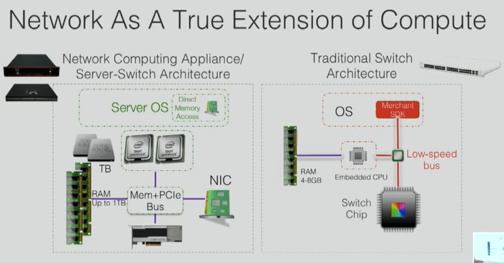
When I think of what Pluribus Networks is doing, I get this image of a high performance server and switch wrapped together, with the bow on top being this extremely clever hypervisor, called Netvisor, talking directly down to the chips in the switches. These server-switches allow Pluribus to do some pretty nifty things when it comes to networking.

This slide from Alessandro Barbieri’s presentation at Networking Field Day 8 helps me visualize what they are doing in comparison to traditional switch architecture:

chip


Network design-wise you will find that Pluribus is using the spine/leaf architecture that we are all coming to know and love. While there is no single recommended pod size, 12 to 24 racks were mentioned throughout their Network Field Day 8 presentations as the most commonly seen deployments.

These server-switches all make up a cluster – each with the same view of the network, talking to the others over TCP connections in a peer to peer fashion.  There is no centralized controller in this architecture, and each node in the cluster uses a three phase commit process to keep information synchronized with its peers. This means that either all the nodes are on board with a change, or the change just doesn’t happen. Much better than trying to rollback a change that wasn’t 100% successful across all nodes. The cluster is managed and appears as one big fabric, again a common theme that SDN is delivering on.

One of the cool things that Pluribus has focused their technology on is real time and stored analytics, the ability to “record” the network traffic and, in Pluribus’ case, this doesn’t require a separate fabric or taps. This is a pretty huge distinction considering the cost of monitoring alternatives and the time/effort that could be spent to maintain a separate monitoring fabric.

Pluribus’ technology does allow you to slice up your network into tenants and there is a strong emphasis on programmability, automation, and integration with OpenStack. Your basic “cloud in a box” – a box you will have plenty of resources to run advanced L4-7 services on.

This video from Networking Field Day 8 demonstrates just some of the analytics possible, but I’d also recommend checking out the demos from Networking Field Day 7 to see a bit more product-in-action videos.  I also really like this write up by @mrtugs – he does an excellent job further explaining the architecture and exploring the possibilities that stem from this server-switch goodness.


Published: 10/7/2014


Disclaimer: While Networking Field Day, which is sponsored by the companies that present, was very generous to invite me to this fantastic event and I am very grateful for it, my opinions are totally my own, as all redheads are far too stubborn to have it any other way.